



Every top AI model in one place.
Built for Mac developers and power users.

Oops! Something went wrong while submitting the form.
Key takeaways
Gemini 3 is worth testing for Mac apps that need configurable reasoning and multimodal input, but Google’s newest flagship is now Gemini 4 Argon. In four coding tests, Gemini matched or beat GPT-5.6 and Claude 5.5 in three and trailed by one point on long-document retrieval. Gemini 3.8 Flash costs $0.75 input and $3.75 output USD per million tokens until December 31, 2026, then $1.50 and $7.50.
In this guide, I’ll take you through Gemini 3 from a developer’s perspective. I’ll cover the capabilities, the API pricing, and the Swift integration. I’ll also look at where it fits against GPT-5.6 and Claude 5.5, and how to keep your app flexible when you want to move to a newer model.
Gemini 3 adds the thinking_level parameter and stronger agentic and multi-step capabilities over Gemini 2.5, while keeping the same 1M-token input and 65,536-token output limits. Gemini 2.5 already supported reasoning, multimodal input, and tool use.
Here are a few changes worth paying attention to.
You can now set the thinking level you want because it affects latency. This is thanks to a new thinking_level parameter that has options such as low, medium, and high. The default is high, but that means most straightforward requests may use more reasoning than your feature needs. Just be careful not to reduce the answer quality.
Gemini 3 models accept up to 1,048,576 input tokens and can generate up to 65,536 output tokens. That matches Gemini 2.5 and is up from the 8,192 output tokens Gemini 2.0 debuted with. It gives developers more room to experiment with large documents, code excerpts, and conversation history. But it doesn’t automatically translate to more accuracy in retrieval, so test that with your app’s actual data.
Gemini handles text, images, video, audio, and PDF documents within a single unified architecture. This means that you don’t have to chain together separate OCR, speech-to-text, or document-parsing APIs before sending data to the model. You can also control visual ingestion density (media_resolution) to balance token costs and processing speed.
You can now use Gemini’s Function Calling to carry out tasks by pairing it with built-in tools such as Google Search, URL Context, and code execution. You can therefore build features and workflows that do more than just generate text.
Here’s how these changes compare with Gemini 2.5:
| Capability | Gemini 2.5 Flash | Gemini 3 Flash Preview |
|---|---|---|
| Reasoning controls | thinking_budget lets you set a token budget for reasoning | thinking_level lets you choose a reasoning level, making the setting easier to manage |
| Complex tasks | Supports reasoning and tool use | Combines configurable reasoning with updated capabilities for complex, multi-step tasks |
| Multimodal input | Supports text, images, audio, video, and documents | Supports multimodal workflows across text, images, audio, video, and PDFs |
| Tool use | Supports Function Calling and supported tools | Supports agentic workflows |
| Context window | Up to 1 million input tokens | Up to 1 million input tokens |
| Maximum output | Up to 65,536 tokens | Up to 65,536 tokens |
Sources: Google's Gemini 2.5 Flash documentation and Gemini 3 Flash Preview documentation.
Gemini 3 matched or beat GPT-5.6 and Claude 5.5 in three of four tests and trailed by one point on long-document retrieval. I gave each model the same four tasks: a Swift utility, project-brief retrieval, structured JSON, and image extraction.
In the first test, I asked the three models to write a Swift function. It needed to filter filenames by extension, ignore hidden files, handle files without extensions, and sort the results. I also wanted to see how each implementation deals with edge cases such as empty arrays.
All three models passed the Swift utility test with 7/7. The differences were small: ChatGPT and Claude checked the last path component to detect hidden files, while Gemini checked whether the filename started with a dot.
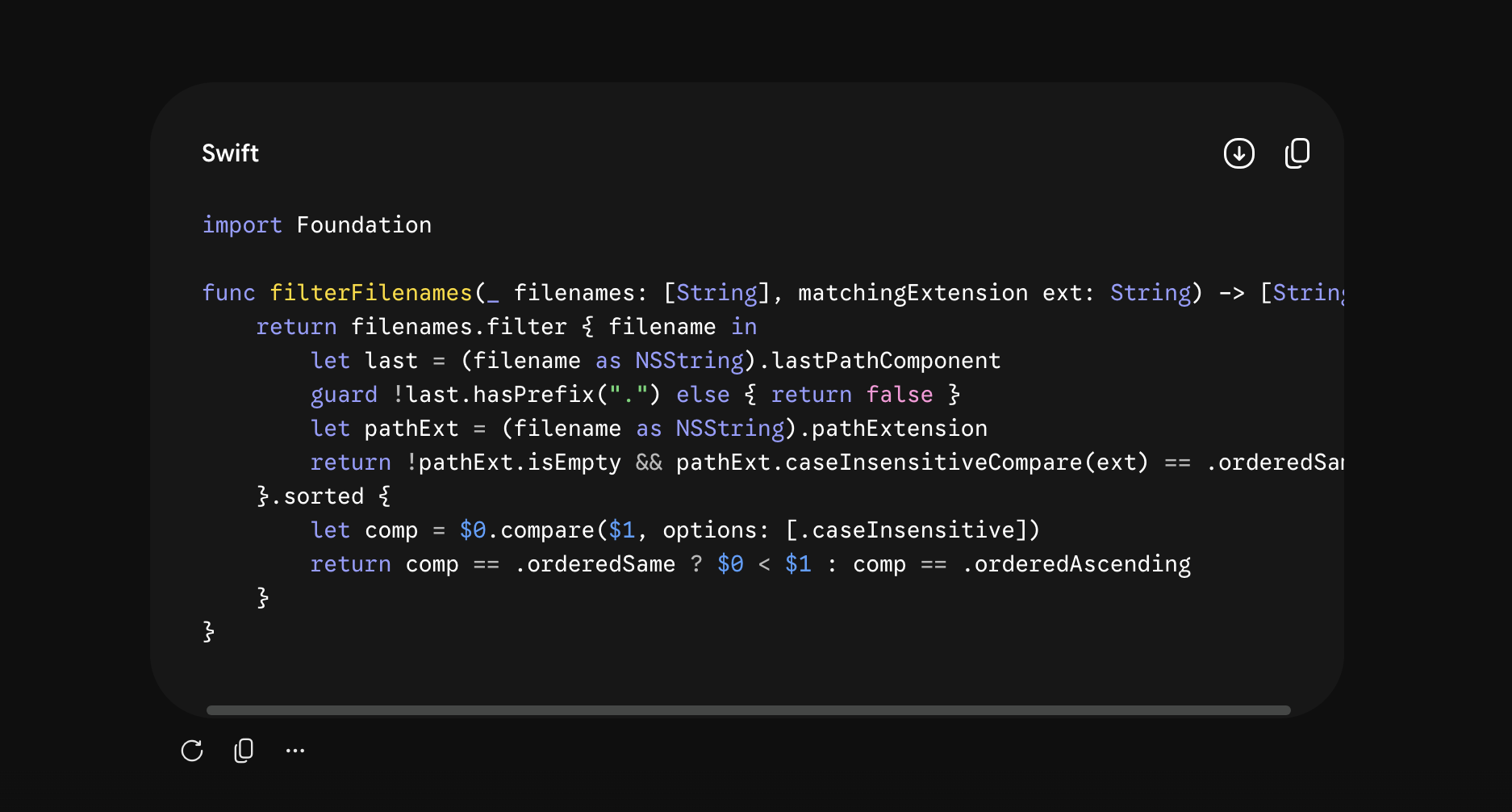
ChatGPT also used localized case-insensitive sorting, while Gemini and Claude used regular case-insensitive comparison. Neither approach is wrong, but they can sort differently.
In the second test, I gave each model five project files and asked questions about the outstanding bugs, retention policies, and unresolved decisions, among others. I wanted to see how each could reconcile information across documents.
ChatGPT and Claude scored 9.5 on the long project brief, and Gemini scored 8.5 because it missed a requirement about unresolved data-loss bugs.
In the third test, I wanted to see how reliably the three models could turn inconsistent output into data that another app could use. I gave them four records and a detailed set of normalization rules. They needed to standardize content types, remove duplicate tags, and preserve record order, among other requirements.
All three models scored 10/10 on structured JSON, returning valid arrays that passed JSON Schema validation.
Since you can’t always work with clean text, I tested the models with an image of a packed workspace.
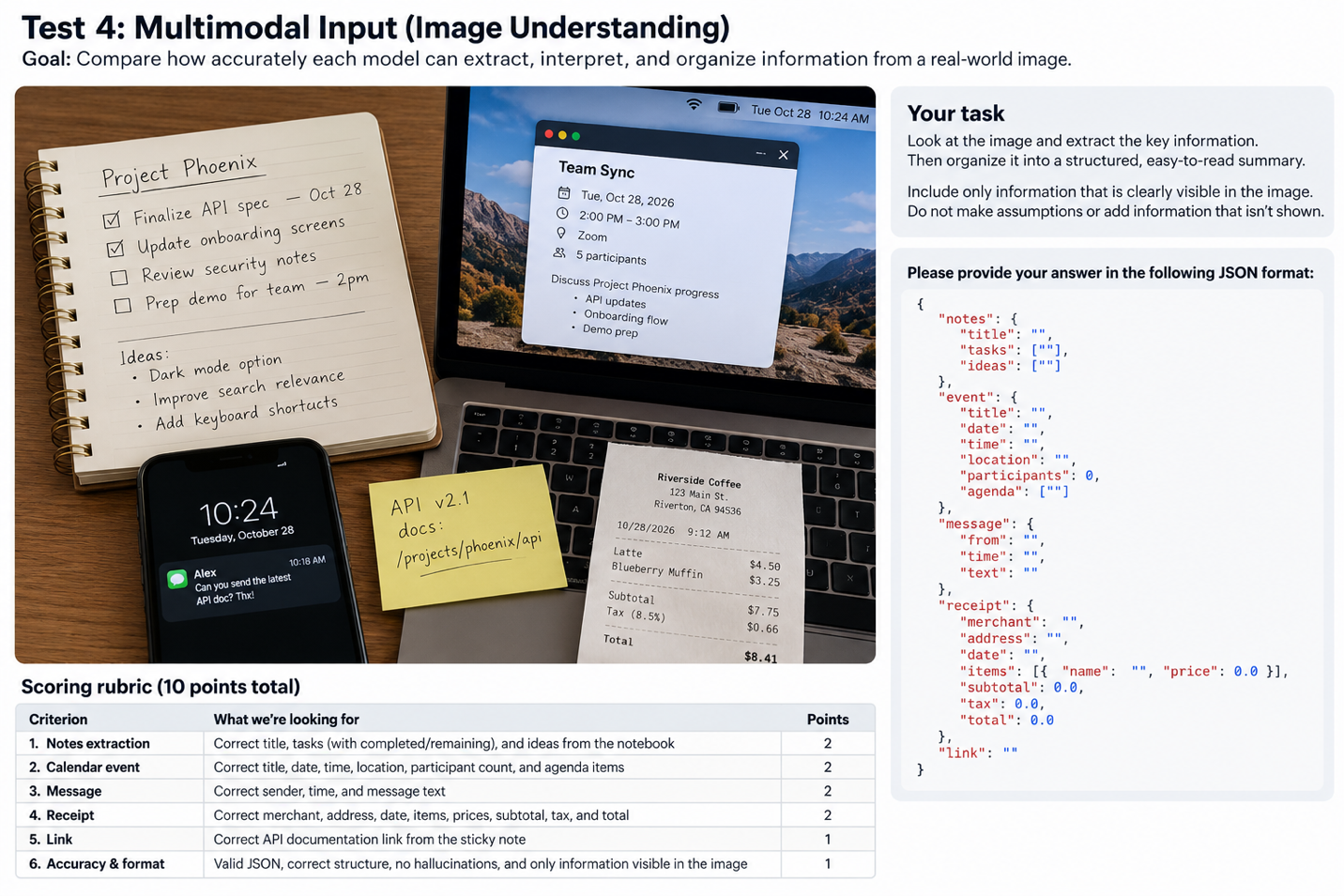
I then asked each model to extract the information into a predefined JSON structure.
All three models handled the main details well, extracted tasks with their completion dates, and calculated no extra values in the receipt, among several other tasks.
Gemini and Claude scored 9.5/10 on image extraction, and ChatGPT scored 9/10. Gemini misspelled “shortcuts,” ChatGPT changed “Riverton” to “RiverTown,” and Claude omitted the receipt’s visible time, 9:12 AM.
Across all four tests, there’s no model that consistently came out on top. Gemini 3.5 matched ChatGPT 5.6 and Claude 5.5, only missing a point in the long-text retrieval test.
The practical takeaway is to choose based on how your app works, not on a model you expect to be consistently ahead. To see how Gemini ranks on public leaderboards, check Setapp’s Gemini models comparison table.
You can access Gemini through Google AI Studio if you are prototyping, the Gemini API if you want direct app integration, or Vertex AI if your app is built on Google Cloud. Model rates, free-tier eligibility, and available billing options depend on the route and model.
| Access path | Pricing and charges | Best for |
|---|---|---|
| Google AI Studio | Free tier for supported models, subject to rate limits and data-use terms | Prototyping and testing prompts |
| Gemini API, Standard Input/Output per 1M tokens | Gemini 2.5 Flash-lite: $0.10 / $0.40 Gemini 3.5 Flash-Lite: $0.30 / $2.50 Gemini 3.8 Flash: $0.75 / $3.75 (doubles to $1.50 / $7.50 on Jan 1, 2027) Gemini 3.1 Pro: $2.00 / $12.00 or $4.00 / $18.00 above 200k tokens | Direct integration into a Mac app |
| Gemini API, Batch | 50% of Standard token rates for supported asynchronous jobs | Bulk processing that can wait up to 24 hours |
| Vertex AI | Core model rates vary by model and service tier. Flex and Batch offer lower-cost processing; Priority costs more | Production apps using Google Cloud infrastructure |
Prices are in USD per million tokens. Output charges include thinking tokens. Check Google's Gemini API pricing and Vertex AI pricing for model-specific terms.
Let's say your Mac app has 1,000 daily active users, each making five calls per day. If each call averages 1,000 input tokens and 300 output tokens, that's 150 million input tokens and 45 million output tokens per 30-day month.
Here’s what it translates to across Gemini models:
| Model (Gemini) | Input/month | Output/month | Total/month |
|---|---|---|---|
| 2.5 Flash-Lite | $15.00 | $18.00 | $33.00 |
| 3.5 Flash-Lite | $45.00 | $112.50 | $157.50 |
| 3.8 Flash (to Dec 31, 2026) | $112.50 | $168.75 | $281.25 |
| 3.8 Flash (from Jan 1, 2027) | $225.00 | $337.50 | $562.50 |
| 3.1 Pro (up to 200K) | $300.00 | $540.00 | $840.00 |
| 3.1 Pro (over 200K) | $600.00 | $810.00 | $1,410.00 |
| 4 Argon (to Nov 30) | $300.00 | $450.00 | $750.00 |
| 4 Argon (from Dec 1) | $600.00 | $900.00 | $1,500.00 |
*Based on 1,000 users × 5 calls a day × 30 days, with 1,000 input and 300 output tokens per call.
To lower costs, you can route simple requests to the lower models. They are good enough for those. Also, don't embed your private API key in the app’s code. Use a backend or gateway to protect your API key from malicious actors and control usage. To compare context windows and prices across providers, use the AI model comparison tool.
To see how Gemini three handles prompts on a Mac app, try it in BoltAI from Setapp. BoltAI lets you connect your own Google AI API key, or you can use your Setapp AI credits instead. Setapp Membership is one subscription to 300+ curated Mac, iOS, and web apps and includes 1,000 AI credits a month.
Here's how to use Gemini 3 with BoltAI:
You can now start using the app.
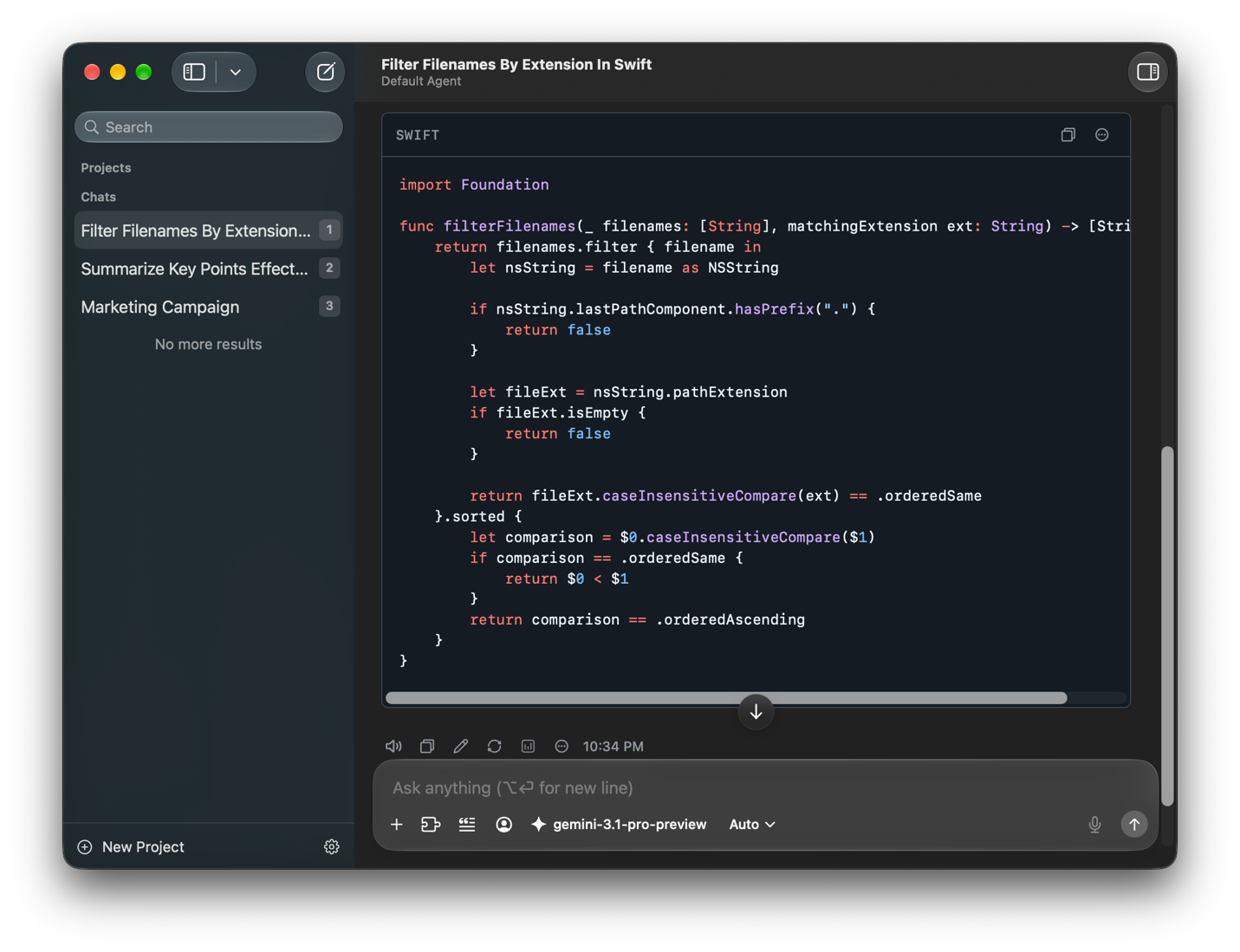
Try a few prompts to gauge the experience. New to Mac AI apps? Read A Mac user’s guide to LLMs, which explains how apps like BoltAI connect to models.
To make integration easier, I’ll walk through a Swift example. This Swift example calls Gemini 3.8 Flash through Google’s Interactions API, streams the reply to Terminal, and uses URLSession, typed errors, and exponential-backoff retries.
In this version, I’ve used Xcode Command Line Tools to simplify the illustration.
Create an API key in Google AI Studio and set it as the GEMINI_API_KEY environment variable. In the example, the implementation reads the key at runtime instead of storing it in the source code. You should also ensure you don’t ship your app with a key in the source code.
import Foundation
// Streams a Gemini 3 reply to the terminal. Needs macOS 12 or later.
// Run with: GEMINI_API_KEY=your-key swift main.swift "Your question here"
let modelID = "gemini-3.8-flash"
let endpoint = URL(string: "https://generativelanguage.googleapis.com/v1beta/interactions")!In the implementation, I’ve used Gemini 3.8-flash and Google’s Interactions API endpoint. To test another supported model, just change the model ID and use the exact one used in Google’s current model documentation.
import Foundation
// Streams a Gemini 3 reply to the terminal. Needs macOS 12 or later.
// Run with: GEMINI_API_KEY=your-key swift main.swift "Your question here"
let modelID = "gemini-3.8-flash"
let endpoint = URL(string: "https://generativelanguage.googleapis.com/v1beta/interactions")!The code groups API failures (like a wrong API key) into readable errors and marks temporary failures, such as rate limits and service outages, as retryable. This helps the app distinguish errors it can recover from from those that need attention.
// MARK: - Errors
enum GeminiError: Error, LocalizedError {
    case missingAPIKey
    case badResponse
    case api(code: String, message: String) // failed before any text arrived
    case interrupted(code: String, message: String) // failed after text had started
    var errorDescription: String? {
        switch self {
        case .missingAPIKey:
            return "Set the GEMINI_API_KEY environment variable first."
        case .badResponse:
            return "The server did not return an HTTP response."
        case .api(let code, let message), .interrupted(let code, let message):
            return "Gemini API error (\(code)): \(message)"
        }
    }
    /// Only errors that happen before any text was shown are safe to retry.
    var isRetryable: Bool {
        guard case .api(let code, _) = self else { return false }
        return ["rate_limit_exceeded", "too_many_requests", "api_error",
                "service_unavailable", "gateway_timeout", "deadline_exceeded"].contains(code)
    }
}
func defaultCode(for status: Int) -> String {
    switch status {
    case 400: return "invalid_request"
    case 401: return "authentication"
    case 402: return "payment_required"
    case 403: return "permission_denied"
    case 404: return "not_found"
    case 429: return "rate_limit_exceeded"
    case 500: return "api_error"
    case 503: return "service_unavailable"
    case 504: return "deadline_exceeded"
    default: return "http_\(status)"
    }
}

func apiError(status: Int, body: Data) -> GeminiError {
    var code = defaultCode(for: status)
    var message = "HTTP \(status)"
    if let json = try? JSONSerialization.jsonObject(with: body) as? [String: Any],
       let details = json["error"] as? [String: Any] {
        code = (details["code"] as? String) ?? code
        message = (details["message"] as? String) ?? message
    }
    return .api(code: code, message: message)
}Gemini usually sends its responses as a stream of server events. The code extracts text as it arrives, captures token usage after interaction, and skips event types it doesn’t recognize.
// MARK: - Stream events
struct StreamEvent: Decodable {
    let eventType: String
    let delta: Delta?
    let interaction: Interaction?
    let error: Failure?
    struct Delta: Decodable { let type: String?; let text: String? }
    struct Interaction: Decodable { let status: String?; let usage: Usage? }
    struct Usage: Decodable { let totalTokens: Int? }
    struct Failure: Decodable { let code: String?; let message: String? }
}The streamReply function sends the prompt and processes the response with URLSession. It then passes text chunks to a callback so the app can update its interface as the answer arrives.
// MARK: - Streaming call
/// Sends one prompt and calls `onText` for every piece of text as it arrives.
/// Returns the total token count when the server reports it.
func streamReply(to prompt: String, apiKey: String, onText: (String) -> Void) async throws -> Int? {
    var request = URLRequest(url: endpoint)
    request.httpMethod = "POST"
    request.setValue(apiKey, forHTTPHeaderField: "x-goog-api-key")
    request.setValue("application/json", forHTTPHeaderField: "Content-Type")
    request.timeoutInterval = 120
    request.httpBody = try JSONSerialization.data(withJSONObject: [
        "model": modelID,
        "input": prompt,
        "stream": true
    ] as [String: Any])
    let (bytes, response) = try await URLSession.shared.bytes(for: request)
    guard let http = response as? HTTPURLResponse else { throw GeminiError.badResponse }
    // A non-200 status means no stream started. Read the error body and map it.
    guard http.statusCode == 200 else {
        var body = Data()
        for try await byte in bytes { body.append(byte) }
        throw apiError(status: http.statusCode, body: body)
    }
    let decoder = JSONDecoder()
    decoder.keyDecodingStrategy = .convertFromSnakeCase
    var receivedText = false
    var totalTokens: Int?
    for try await line in bytes.lines {
        guard line.hasPrefix("data:") else { continue }
        let payload = line.dropFirst(5).trimmingCharacters(in: .whitespaces)
        if payload == "[DONE]" { break }
        // Google asks clients to skip events they do not recognize.
        guard let event = try? decoder.decode(StreamEvent.self, from: Data(payload.utf8)) else { continue }
        switch event.eventType {
        case "step.delta":
            if event.delta?.type == "text", let text = event.delta?.text {
                receivedText = true
                onText(text)
            }
        case "interaction.completed":
            totalTokens = event.interaction?.usage?.totalTokens
        case "error":
            let code = event.error?.code ?? "unknown"
            let message = event.error?.message ?? "No details provided."
            let failure: GeminiError = receivedText
                ? .interrupted(code: code, message: message)
                : .api(code: code, message: message)
            throw failure
        default:
            continue
        }
    }
    return totalTokens
}If an error is retryable, the wrapper waits with exponential backoff and retries up to four times. It avoids retrying errors that can’t be fixed by waiting, such as exhausted quotas.
// MARK: - Retry with exponential backoff
func withRetries<T>(maxAttempts: Int = 4, _ operation: () async throws -> T) async throws -> T {
    var attempt = 1
    while true {
        do {
            return try await operation()
        } catch let error as GeminiError where error.isRetryable && attempt < maxAttempts {
            let delay = pow(2.0, Double(attempt)) + Double.random(in: 0...0.5)
            printError("\(error.localizedDescription) Retrying in \(Int(delay.rounded())) seconds...")
            try await Task.sleep(nanoseconds: UInt64(delay * 1_000_000_000))
            attempt += 1
        }
    }
}
func printError(_ text: String) {
    FileHandle.standardError.write(Data((text + "\n").utf8))
}To run the Swift implementation, save the blocks in a file named main.swift.
You can then run it from Terminal:
export GEMINI_API_KEY="paste-your-key-here"
cd ~/Downloads
swift main.swift "Give me three names for a note-taking Mac app"
The key you provide in Terminal will last for that session, and you’ll need to provide it next time.
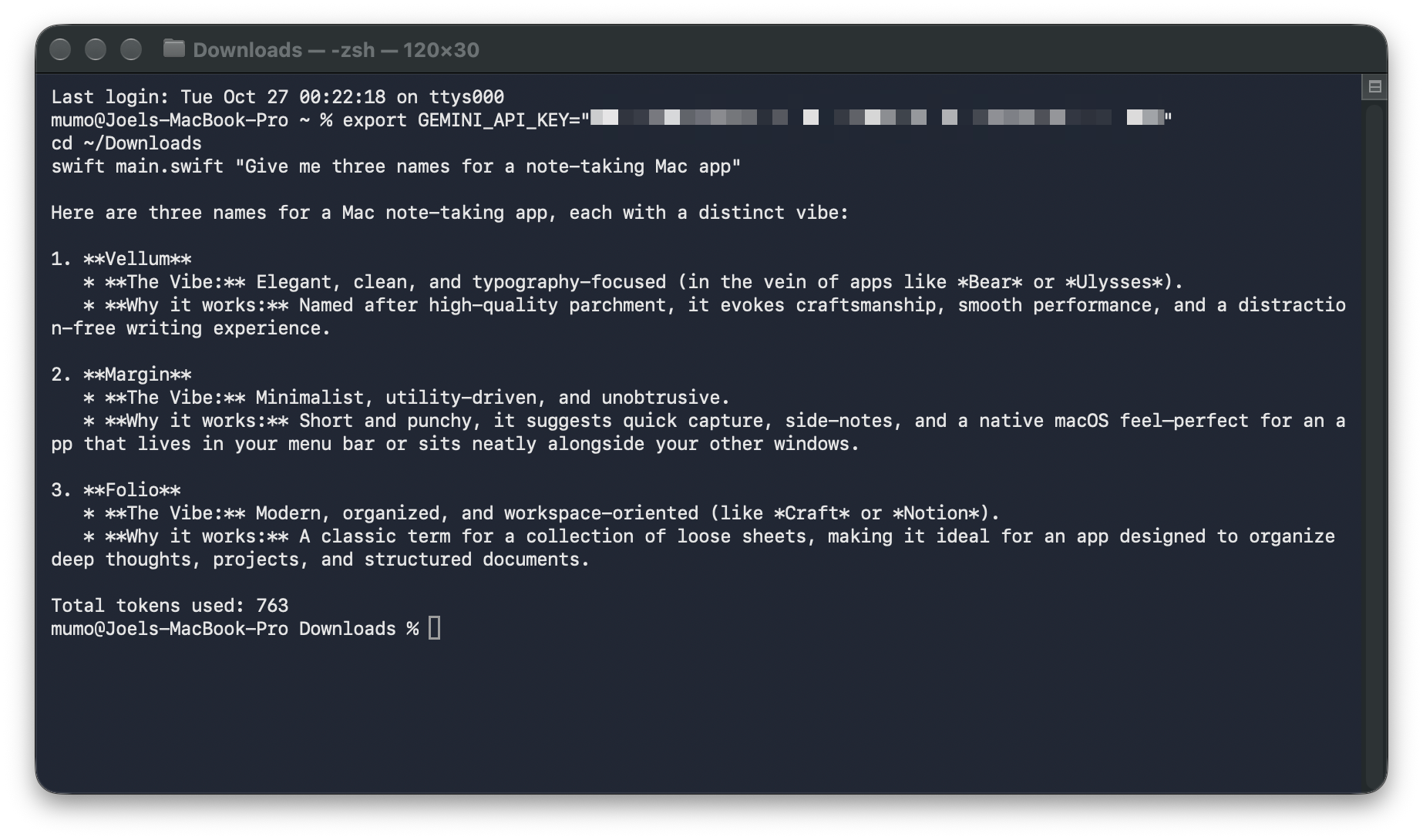
Integrating a Swift implementation with a Gemini API key in Terminal
Tested on macOS 27.0.1 with Apple Swift 6.4 on Apple Silicon, October 27, 2026. The endpoint, model ID, authentication header, and streaming event format were checked against Google’s Gemini API documentation on the same date. Confirm the model ID before using it in production.
If you hard-code one provider in your app, you’ll have to re-integrate every launch cycle. You’ll need to update the SDK, adjust prompts, revisit API costs, and test the new model to make sure everything works as expected. Now, repeat that cost across providers, and keeping up with AI will start taking time away from the actual product.
Setapp AI Gateway offers a simpler approach to integrating multiple AI models. See the AI Gateway documentation and the list of supported models for setup and current availability.
Once your Gemini 3 app is out, you’ll need to get it in front of users. Setapp gives developers access to an established audience that already pays for and actively uses Mac apps. You can apply to distribute your app through Setapp for Developers, subject to review and approval. The platform then handles app discovery, licensing, billing, and other distribution tasks so you can focus on building your AI product.
Gemini 3 is worth testing if you need relatively affordable access to agentic workflows, configurable reasoning, and multimodal input for working with complex tasks. But if your app mostly relies on simpler requests, you may not need to upgrade from Gemini 2.5 Flash.
To try both models in a Mac-native app, you can install BoltAI from Setapp to try Gemini, GPT, and Claude models in one Mac app. Test every new model in one Mac app, without extra API keys. Setapp Membership includes BoltAI and 300+ other apps. Free for 7 days. AI apps use credits, 1,000 included. Start My 7-Day Trial.
And as you get the app ready, you can apply to use Setapp AI Gateway and reach Setapp’s existing audience of Mac users.
FAQ
Gemini 3 adds the thinking_level parameter, which lets you choose how much the model reasons, and improves multi-step and agentic tasks. It keeps the same 1M-token input and 65,536-token output limits as Gemini 2.5. Gemini 2.5 used thinking_budget, a token budget, instead.
Gemini 3.8 Flash costs $0.75 input and $3.75 output USD per million tokens through December 31, 2026, then $1.50 and $7.50. Gemini 3.5 Flash-Lite costs $0.30 and $2.50. Gemini 3.1 Pro costs $2.00 and $12.00 for prompts up to 200,000 tokens, and $4.00 and $18.00 above that. Google AI Studio offers free usage for supported models.
No, Gemini 3 is not consistently better. In four coding tests against GPT-5.6 and Claude 5.5, Gemini beat ChatGPT on image extraction (9.5 vs 9), trailed on long-document retrieval (8.5 vs 9.5), and tied on the Swift and JSON tests. Choose based on what your app does.
Use BoltAI from Setapp, a native Mac AI app. Add your Google AI API key under Settings > Providers, or sign in through Setapp to use monthly AI credits instead. Setapp Membership includes 1,000 AI credits a month, 300+ apps, and a 7-day free trial.
Yes, with Setapp AI Gateway, which gives macOS and web apps one OpenAI-compatible API for OpenAI, Anthropic, Google Gemini, and xAI models. You switch models by changing the model string, such as openai/gpt-4. iOS support is planned. See the AI Gateway docs for setup and the supported models list for current availability.
Gemini 4 Argon is Google’s newest flagship, released on October 13, 2026, as gemini-4-argon. It costs $2 input and $10 output USD per million tokens until November 30, then $4 and $20. Google reports stronger results, but those are vendor figures, so test it on your own tasks.
Unlimited access to every AI tool
Dozens of AI models, thousands ofusers
