




Every top AI model in one place.
Built for Mac developers and power users.

Oops! Something went wrong while submitting the form.
Key takeaways
Vibe coding is when you prompt an autonomous agent to write software for you in plain language. You might tell a tool like Claude Code, “Write a macOS utility that strips clipboard formatting,” rather than reading the docs and typing the Swift yourself.
You describe the behavior, and the AI deals with the implementation.
I built a working clipboard cleaner last weekend simply by talking to Claude Code in my terminal.
In this guide, I will define this workflow precisely and walk through a real build process. We will look at the exact prompts used and also cover the backend infrastructure you need when moving that prototype to production. If you’re skeptical, this guide covers where vibe coding breaks, not just where it works. I’ll define it, build a real Mac menu bar app with Claude Code, and show what a prototype still needs before it can ship.
Vibe coding is building software by describing what you want in plain language, letting an AI agent write the code, and iterating on the running result instead of the source files. Andrej Karpathy coined the term in a February 2025 post on X. It differs from autocomplete tools like GitHub Copilot, which suggest code while you type.
Andrej Karpathy, a co-founder of OpenAI and former Tesla AI Director, coined the term on X in early 2025. He mentioned building features for a personal project where he mostly steered the AI and barely read the generated source files. The post went viral immediately, and the developer community quickly adopted the term to describe this new execution model.
As the phrase trended, engineers began searching for the exact vibe coding meaning with healthy skepticism. Most assumed it was just a marketing rebrand for traditional inline tools like GitHub Copilot that suggest code line by line inside Xcode. Practical vibe coding for developers flips that workflow into an agentic execution loop. You request a feature and run the build execution. Then you instruct the agent to resolve any compiler errors that emerge.
Traditional AI-assisted coding gives you inline syntax suggestions as you go, with you remaining the sole author of the source files. Agentic vibe coding is the opposite in that it hands over the actual file modification to an autonomous tool (e.g., Claude Code). You cease to write the actual implementation and just review the diffs and the compiled binaries.
| Approach | Example | Who writes | Who reviews | Unit of work | Skill needed |
|---|---|---|---|---|---|
| Autocomplete | GitHub Copilot | You, with AI finishing lines | You, line by line | A line or block | Enough to write the code yourself |
| Chat-assisted | Asking ChatGPT | You paste and adapt snippets | You | A function | Enough to integrate answers |
| Agentic vibe coding | Claude Code, Cursor | The AI, across your project | You, through diffs and the running app | A feature or a whole app | Enough to evaluate results |
The last row is the one that surprises skeptical seniors. Your job moves from writing to judging. That is a different skill, and it is easy to overestimate how much of it you have.
Vibe coding works by prompting an AI agent in your terminal to generate the source files, then running the app and telling the agent what to fix. In this build, Claude Code created a working macOS menu bar clipboard cleaner in twelve minutes from three prompts.
To see this workflow in action, I built a macOS menu bar app from scratch in an empty directory using Claude Code. The aim was a clipboard cleaner that would strip all the rich text formatting from copied text and also maintain a history of the last five items.
So I opened my terminal and typed claude.
You have to set strict architectural boundaries immediately. If you leave the framework open, the agent might guess incorrectly and pull in outdated Objective-C libraries.
My prompt:
“Create a macOS menu bar app in SwiftUI. It needs to monitor the system clipboard. Each time I copy text, strip all rich formatting and replace the clipboard content with plain text. Show the last five copied items in a popover when the menu bar icon is clicked.”
Claude Code spun up and began executing terminal commands. It created the Package.swift file. Then it drafted the App.swift entry point and a ClipboardMonitor class to handle the system observer.
I compiled the project. The menu bar icon appeared. I immediately hit a critical bug.
For more on writing prompts that agents follow, see prompt engineering for Mac.
The app froze my system clipboard. It was caught in an infinite write loop. The app stripped the formatting and wrote plain text back to the clipboard. The macOS system saw new text on the clipboard and notified the app. The loop started over.
In a traditional workflow, I would open Xcode to wire up a logic gate. In a vibe coding workflow, you describe the failure to the terminal.
My prompt:
“The app is caught in an infinite loop. When it writes plain text to the clipboard, the monitor detects that as a new copy event. Use NSPasteboard.changeCount to ignore writes that the app itself just triggered.”
Claude read the project files and autonomously modified the ClipboardMonitor.swift file. It added a tracking variable to break the cycle:
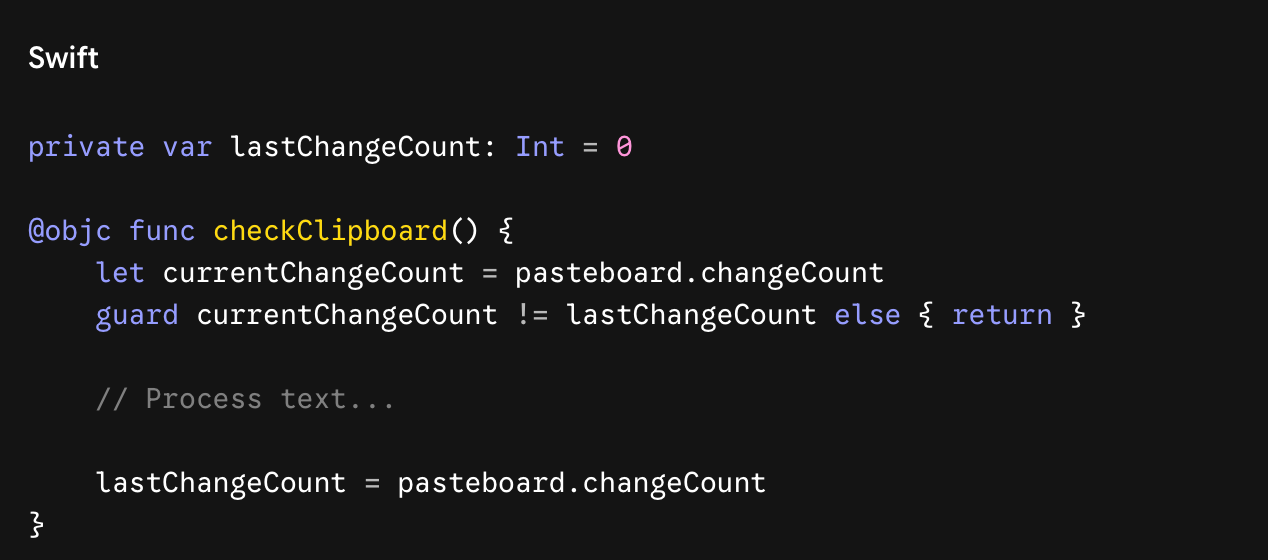
I recompiled the app. The infinite loop disappeared entirely.
The core utility worked perfectly. But! The user interface required more polish. The copied text wrapped awkwardly across multiple lines, and the user had no way to clear the local history.
My prompt:
“Make the popover look native to macOS. Truncate the text items to a single line. Add a subtle hover effect to each row. Put a 'Clear History' button at the bottom.”
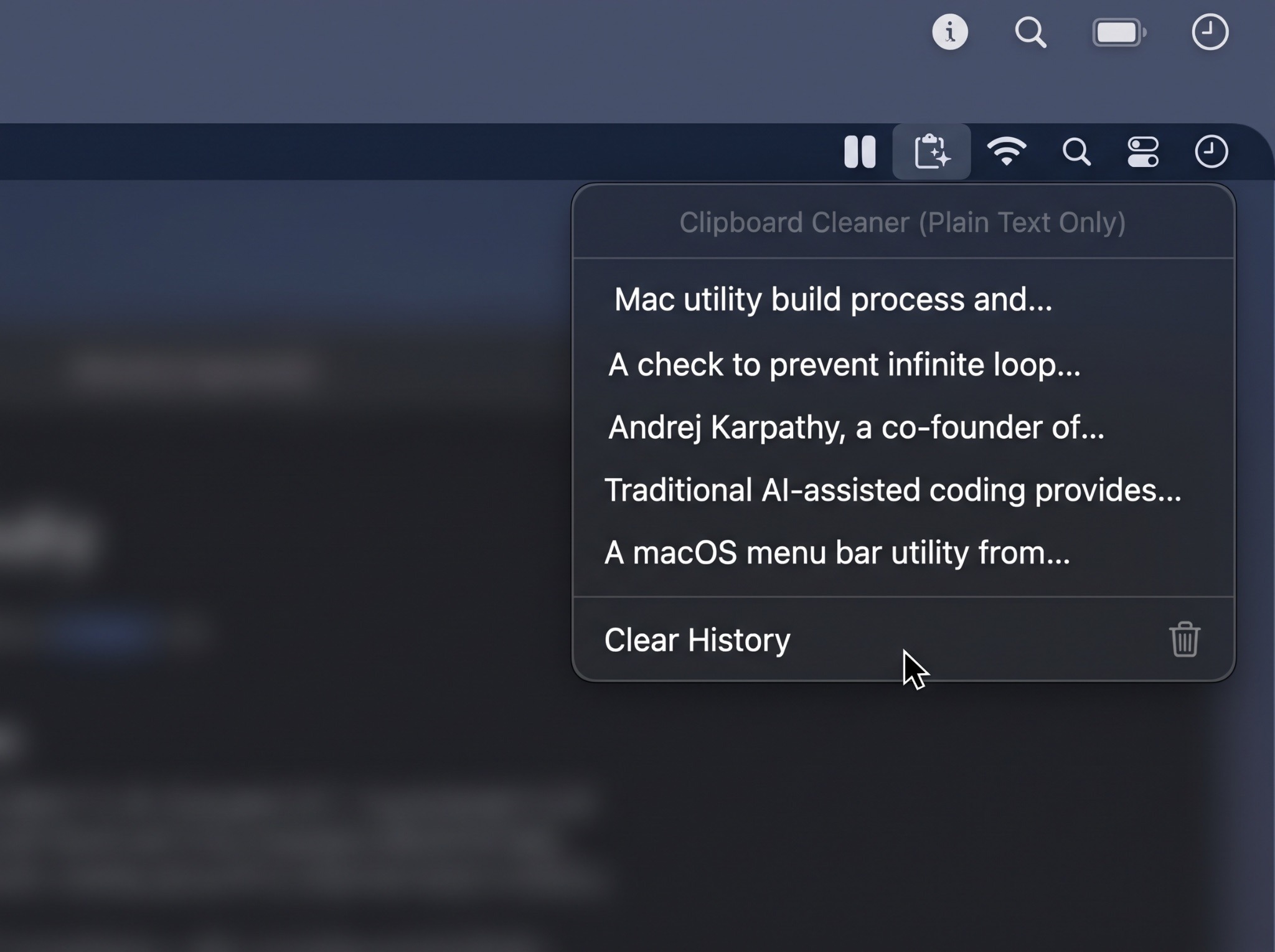
The entire build process took twelve minutes. I never opened Xcode to type a Swift struct manually. I simply tested the compiled binary and located the edge cases where it broke. Once I found a flaw, I directed the agent to patch it. You stop reading every line of source code. You start trusting the output boundaries.
Claude Code is the main vibe coding tool in this guide: Anthropic’s agentic coding tool for the terminal and the Claude desktop app, available on Pro at $20 USD per month. Cursor is the popular IDE-style alternative, and BoltAI helps with quick model questions while you code. Verify plans at claude.com/pricing.
Claude Code is Anthropic’s agentic coding tool. It runs in the terminal and in the Claude desktop app, reads your whole project, and supports MCP. It requires a paid Claude plan. Pro was listed at 20 USD per month at the time of writing, so verify at claude.com/pricing.
Cursor is an AI-first code editor. If you prefer working inside an IDE with inline diffs, it is a fair pick.
BoltAI is useful when you want a quick model query without leaving your work. It is available through Setapp, a subscription service that bundles Mac apps under one plan.
To see how apps like BoltAI connect to models, read Mac user’s guide to LLMs.
Vibe coding works when you can run the code, see what it does, and catch problems yourself, which suits prototypes, utilities, and personal tools. It breaks on authentication, payments, API key handling, large refactors, performance-critical paths, and anything you can’t verify, because a program can run without errors and still be wrong.
Where it shines
Where it breaks
You still own every line you ship. Also change the bullet: Refactoring code across multiple files > Large refactors across multiple files without review.
The last case is particularly risky. A program can run without errors and still produce incorrect results, expose sensitive information, or fail under conditions you have not tested. If you cannot judge whether the code is correct, a successful run tells you very little.
Local prototypes run on your personal API key. Commercial apps require a completely different infrastructure. Hardcoding an OpenAI or Anthropic key into a distributed macOS binary makes it trivially easy for anyone to extract the credentials and drain your account balance.
Moving to a public release requires building a production LLM layer. You have to engineer a custom backend to handle five mandatory components:
Engineering that proxy server takes longer than vibe coding the actual Mac utility. Setapp AI Gateway replaces that custom backend work with a single integration. You access all major LLM models through one secure endpoint. The gateway manages the API keys directly while providing built-in billing based on actual user consumption.
Banner:
Put your finished Mac app in front of paying subscribers
Setapp shares 70% of each subscriber’s fee among developers by app usage, plus a 20% partner fee for users you bring.
Button: Add Your App
To ship a Mac app on Setapp, you integrate the Setapp Framework, submit the build for review, and earn from Setapp Membership: 70% of each subscriber’s fee is shared among developers by app usage and price tier, plus a 20% partner fee for users you bring. Revenue from new users typically appears about 2 to 2.5 months after they join, because the 7-day trial earns nothing. The Setapp developer docs explain the formula. To submit your app, visit the Setapp Partner page.
Start this weekend by installing Claude Code, picking one micro-problem you would normally script in bash, and iterating through diffs until the utility works. Plan for an afternoon to validate a new macOS utility, and decide afterward whether it’s worth shipping.
Apply for AI Gateway early access and Add Your App.
FAQ
Vibe coding means building software by describing what you want in plain language, letting an AI agent write the code, and iterating on the running result instead of the source. Andrej Karpathy coined the term in a February 2025 post on X. You judge the app’s behavior more than each line, but you still own what you ship.
No. GitHub Copilot suggests code while you type, and you remain the author of every file. In vibe coding, an agent such as Claude Code writes across your project from a conversation, and you review diffs and the running app. The unit of work moves from a line or function to a whole feature.
Yes, for small apps and utilities: the clipboard cleaner in this guide took twelve minutes and three prompts. For apps you ship to paying users, you still review security-sensitive code, test failure cases, and add a production layer for keys and billing, because a personal API key can’t ship inside a binary.
Claude Code is the main tool. It needs a paid Claude plan (Pro is $20 USD per month; verify at claude.com/pricing). Cursor is the main IDE-style alternative. Choose Claude Code if you prefer a terminal or desktop app, and Cursor if you prefer an editor with inline diffs.
Only if you can evaluate it, review authentication, payment, and key-handling code by hand, test the failure cases, and never embed a provider API key in the app. A program can run without errors and still expose data, so a successful run isn’t proof of correctness.
Unlimited access to every AI tool
Dozens of AI models, thousands ofusers
